
Multiple PDFs, one QR code
One QR code. Every document they need.
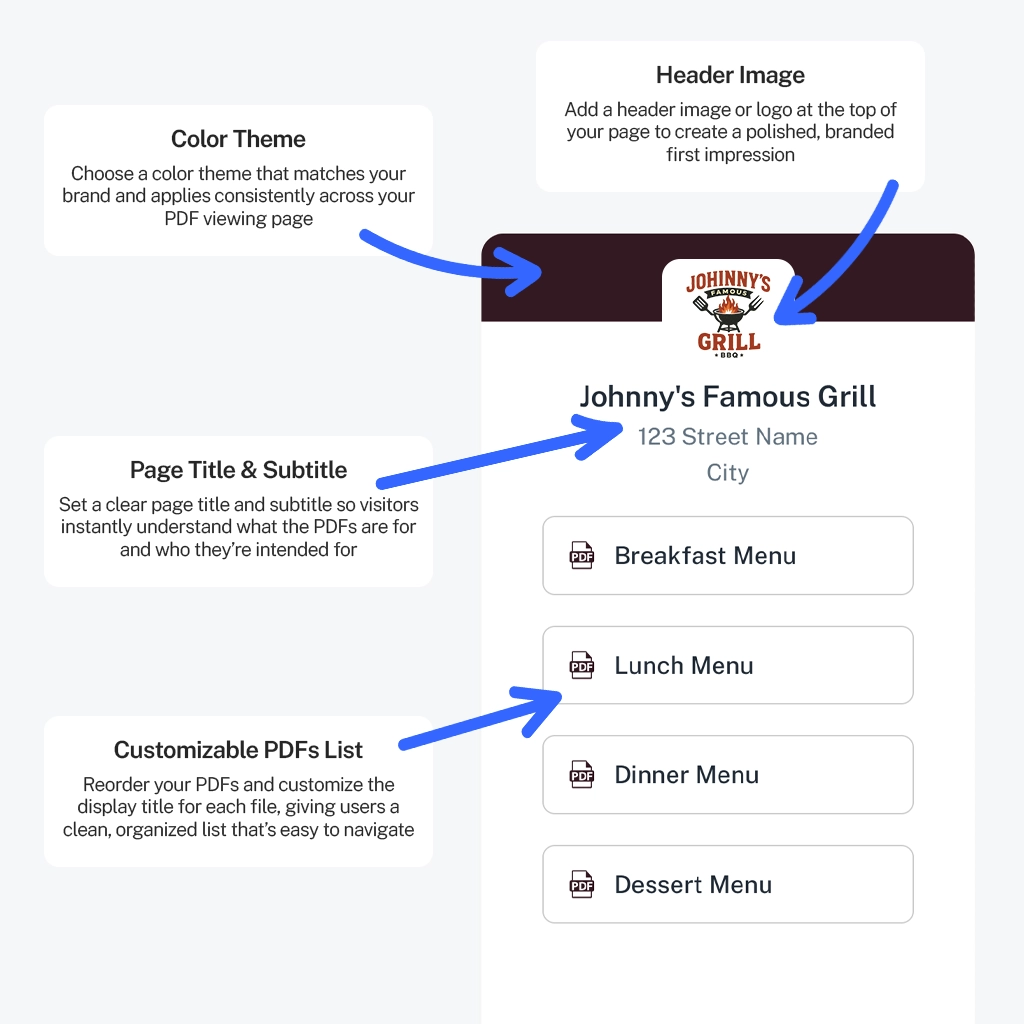
Combine menus, manuals, brochures or a whole document kit behind a single QR code. Visitors see a clean, branded list and tap the PDF they want.
No app needed to scanUnlimited scansUpdate PDFs anytimeFree to try
- No app needed to scan
- Unlimited scans
- Update PDFs anytime
- $99/year, everything included
How it works
A tidy list instead of a wall of codes
Upload as many PDFs as you like to one QR code. PDFQR arranges them in a branded list with your title, header image and theme color.
Drag to reorder, rename how each file is displayed and add or remove PDFs at any time. The printed code never changes.
- Unlimited PDFs per code, up to 100MB each
- Rename display titles without renaming files
- Add, remove or reorder after printing
Benefits
Why one code beats five
Less clutter
One code on the table or sign instead of a row of them.
You set the order
Put the most-used document at the top.
Clear names
Show “Wine list” instead of “wine_v7_FINAL.pdf”.
Add files later
New seasonal menu? Add it to the list, no reprint.
One place to measure
See scans for the whole collection at once.
Great for kits
Onboarding packs, attendee kits, property documents.
Step by step
Build a multi-PDF QR code
Upload your PDFs
Drag in all the files that belong together.
Arrange and rename
Order them by importance and give each a friendly display title.
Brand and publish
Add your header image and color, then download the QR code.
Best practices
Make your list easy to scan through
People decide in seconds. A short, clear list keeps them moving.
- Keep the list focused: around three to eight documents works well
- Put the most requested PDF first
- Use short, plain display titles
- Remove outdated files instead of leaving old versions
- Use Direct view when there’s only one PDF
Good to know
Removing a PDF from a list removes only that file. The rest of the list keeps working.
Each PDF can be up to 100MB. Smaller files open faster on mobile data.
Pricing
Everything included. One simple yearly price.
No per-code fees, no scan limits, no add-ons. Build and preview everything for free, then it’s $99/year (just $8.25 a month) when you’re ready to download.
- Free to try before you pay
- Unlimited QR codes, PDFs, edits and scans
- Every feature included, nothing held back
- A fraction of what many QR generators charge monthly
PDFQR Annual
Free to try
$99per year (USD)
just $8.25/month
Everything PDFQR offers in one plan, billed once a year. Try it free first: you only pay when you’re ready to download your QR codes.
Get started- Unlimited PDF QR codes
- Unlimited scans and edits
- Unlimited PDFs per QR code (up to 100MB each)
- Replace PDFs without changing the QR code
- Branded viewing pages: title, header image, theme color
- QR design: colors, logo and frames
- Real-time scan analytics
- High-resolution PNG and SVG downloads
Billed annually. No setup fees, no per-code fees. Each PDF can be up to 100MB. Service terms apply.
FAQ
Frequently asked questions
Can one QR code open several PDFs?
Yes. Add as many PDFs as you like and PDFQR shows them as a clean, branded list. You can reorder them and rename how each one is displayed.
Is there a limit to how many PDFs I can add?
No. Add as many PDFs as you need, each up to 100MB.
Can I change the order after printing?
Yes. Reorder, rename, add or remove PDFs anytime. The printed QR code stays the same.
Can a single PDF open directly instead of in a list?
Yes. Use Direct view and the PDF opens straight away when scanned.
How much does PDFQR cost?
One plan: $99/year USD, billed annually, which works out to $8.25 a month. It includes unlimited QR codes, PDFs, edits and scans, branded pages and analytics. There are no setup or per-code fees.
More PDFQR features
Your PDF, one scan away.
Upload a file, brand the viewing page and download a print-ready QR code in minutes. Try everything free, then it’s $99/year when you’re ready to download.
No app needed to scanUnlimited scansEverything included