
Branded viewing pages
Your documents, on a page that looks like you.
Every PDFQR code opens a clean, mobile-friendly page with your title, header image and colors, so customers feel like they’re still with you, not lost in a file-sharing app.
No app needed to scanUnlimited scansUpdate PDFs anytimeFree to try
- No app needed to scan
- Unlimited scans
- Update PDFs anytime
- $99/year, everything included
How it works
Customize it in minutes, preview it live
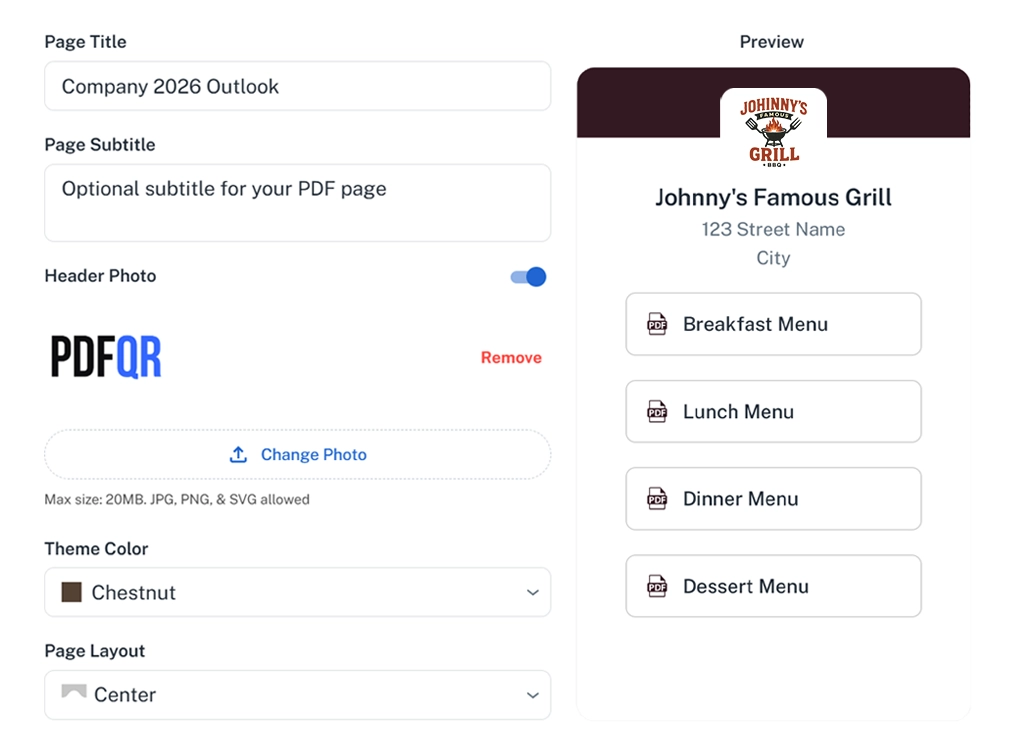
Set a page title and an optional subtitle or welcome message, add a header image or your logo, and choose a theme color. Arrange and rename the PDFs.
A live preview shows exactly what visitors will see on their phone before you publish.
- Title, subtitle and header image
- Theme color
- Several layout styles for lists
- No PDFQR branding on public pages
Benefits
Why a branded page matters
Instant trust
People know they’re in the right place.
Built for phones
Readable, tap-friendly and fast.
Professional finish
A considered page instead of a raw file link.
No distractions
No sign-in prompts or storage-app menus.
On-brand
Your colors and imagery throughout.
Always editable
Change the look anytime; the code stays put.
Best practices
Design a page people enjoy using
Keep it simple. The documents are the star.
- Use a wide, simple header image that crops well on phones
- Write a subtitle that explains what’s inside
- Pick a theme color with good contrast against white text
- Order PDFs by what visitors need first
- Preview on your own phone before you print
Good to know
Your public viewing pages don’t show PDFQR branding.
Visitors read in their phone browser. No app, account or login is required.
Pricing
Everything included. One simple yearly price.
No per-code fees, no scan limits, no add-ons. Build and preview everything for free, then it’s $99/year (just $8.25 a month) when you’re ready to download.
- Free to try before you pay
- Unlimited QR codes, PDFs, edits and scans
- Every feature included, nothing held back
- A fraction of what many QR generators charge monthly
PDFQR Annual
Free to try
$99per year (USD)
just $8.25/month
Everything PDFQR offers in one plan, billed once a year. Try it free first: you only pay when you’re ready to download your QR codes.
Get started- Unlimited PDF QR codes
- Unlimited scans and edits
- Unlimited PDFs per QR code (up to 100MB each)
- Replace PDFs without changing the QR code
- Branded viewing pages: title, header image, theme color
- QR design: colors, logo and frames
- Real-time scan analytics
- High-resolution PNG and SVG downloads
Billed annually. No setup fees, no per-code fees. Each PDF can be up to 100MB. Service terms apply.
FAQ
Frequently asked questions
Can I customize the page that displays my PDFs?
Yes. Set a title, a subtitle or welcome message, a header image, theme colors and the layout of your list.
Can I remove PDFQR branding?
There’s nothing to remove: PDFQR branding doesn’t appear on your public PDF pages.
Can I edit the page after printing the QR code?
Yes. Change anything at any time and the printed code shows the updated page instantly.
Do people need an app to open my PDFs?
No. Any modern phone camera can scan the code, and the PDF opens in the phone’s browser. Viewers don’t need an account, an app or a login.
How much does PDFQR cost?
One plan: $99/year USD, billed annually, which works out to $8.25 a month. It includes unlimited QR codes, PDFs, edits and scans, branded pages and analytics. There are no setup or per-code fees.
More PDFQR features
Your PDF, one scan away.
Upload a file, brand the viewing page and download a print-ready QR code in minutes. Try everything free, then it’s $99/year when you’re ready to download.
No app needed to scanUnlimited scansEverything included